Broken Link Monitoring and Failover for Campaigns, SEO, and Affiliate Links
A practical operating guide for monitoring destination health, catching 404s, timeouts, redirect loops, lost UTMs, and routing traffic to approved fallbacks before budget or SEO value is wasted.

A link can look healthy while the destination behind it is already failing. The branded URL still resolves. The QR code still scans. The ad platform still has a destination. The problem happens one or two hops later: a landing page was unpublished, an affiliate partner changed a URL, a catalog item disappeared, a regional store timed out, or a migration target now returns 404.
That is why broken link monitoring should not stop at "does this short link exist?" It should follow the same route a visitor follows, check the final destination, preserve the parameters that matter, and tell the team what to do before paid, SEO, partner, or offline traffic is wasted.
This guide is for growth, SEO, ecommerce, affiliate, and platform teams that manage links after launch, not only before launch.
The Operating Principle
Monitor the destination outcome, not just the source URL.
A practical monitoring system answers five questions:
- Did the source URL resolve?
- Which redirect hops happened before the final destination?
- Did the final destination return the expected status and content class?
- Were campaign parameters, affiliate IDs, locale paths, and device fallbacks preserved?
- If the destination is unhealthy, should the system alert, pause, route to fallback, or require human review?
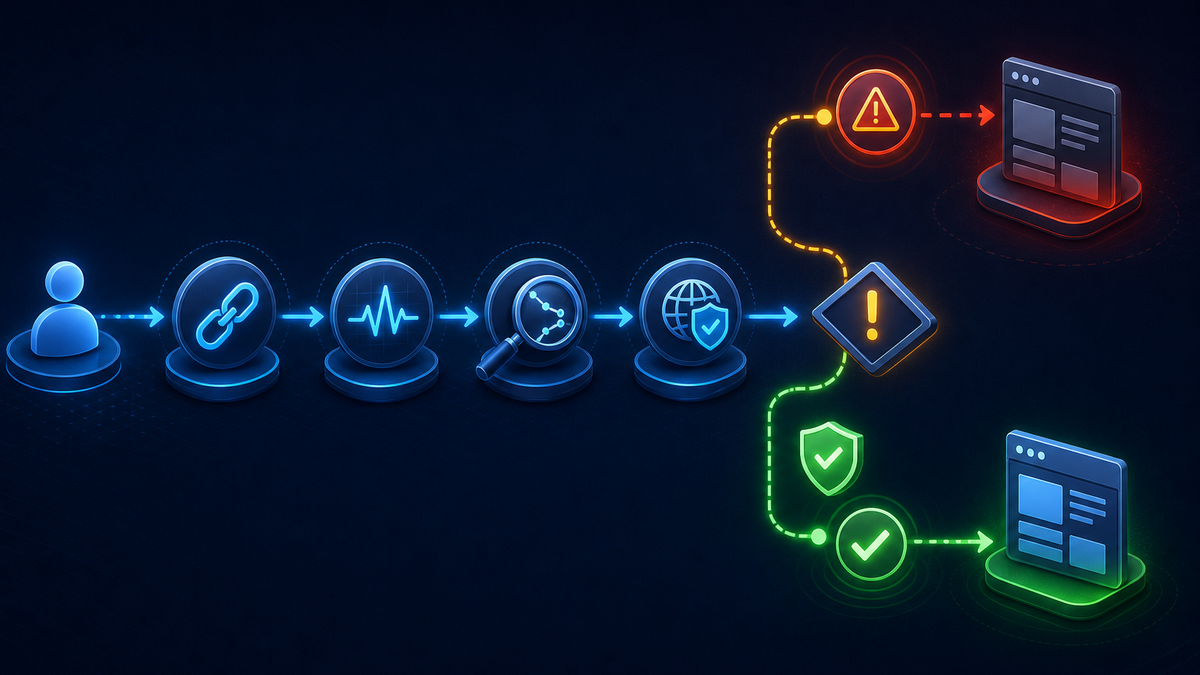
The last question matters because automatic failover is not always the right answer. Some broken links should route immediately to an approved backup. Some should stop a campaign. Some SEO migration targets should alert a human first so the team does not hide a legitimate 404 or create a misleading redirect.
What Counts As Broken Or At Risk
Broken link monitoring should be broader than HTTP 404. A destination can be bad for traffic even when it is not technically "not found."
| Signal | Why It Matters | Typical Response |
|---|---|---|
| 404 or 410 | The expected resource is gone or intentionally removed | Alert owner; route only if a replacement was approved |
| 5xx | Destination server is failing | Alert quickly; use temporary fallback for campaigns if approved |
| Timeout or slow response | Visitors and crawlers may abandon before the page loads | Alert platform owner; consider temporary route for paid traffic |
| Redirect chain | Extra hops add latency and create more places to lose parameters | Trace with Redirect Checker and simplify |
| Redirect loop | Visitor never reaches the destination | Treat as critical for active campaigns and migration targets |
| Wrong final URL | The page returns 200 but no longer matches the link intent | Alert owner; fix destination or route to closer fallback |
| Lost UTM or affiliate parameter | Reporting and commission logic can break while the page still loads | Preserve parameters or rebuild the rule |
| Region or device mismatch | Users reach the wrong store, app fallback, or language page | Use Geo Redirects or Device Targeting with explicit fallback |
This is the difference between a simple crawl and link operations. The goal is not to declare a URL "up." The goal is to protect the visitor path and the reporting contract attached to that path.
Start With Links That Carry Business Cost
Not every link needs the same monitoring frequency. Start with links where failure has a clear cost.
| Link Type | What To Check | Why It Breaks |
|---|---|---|
| Paid campaign landing pages | final URL, status, UTMs, page availability, region | landing pages expire, experiments end, campaign pages are unpublished |
| SEO migration targets | status code, redirect chain, final content match | target pages are removed, merged, canonicalized, or routed through new hops |
| Affiliate and partner links | partner URL, affiliate ID, final destination, timeout | partner catalogs change, networks update tracking URLs, merchants pause pages |
| Printed QR codes | final page, campaign parameters, fallback owner | QR codes cannot be edited after packaging, signage, or events |
| Social bio and creator links | mobile behavior, preview page, destination health | destinations change faster than profile links are updated |
| App fallback pages | iOS, Android, desktop destinations | app store pages, app link files, and web fallback can drift separately |
| Docs and support links | status, replacement article, redirect chain | docs are reorganized while old support answers keep sending traffic |
For each group, define the expected outcome before monitoring starts. "Return 200" is not enough if the page is the wrong product, the wrong country store, the wrong language, or a page that stripped the campaign source.
Build A Triage Policy Before Alerts Fire
Broken link alerts are only useful if the team knows what happens next. Otherwise monitoring becomes another noisy dashboard.
Create a triage policy with four fields:
| Field | Decision To Make |
|---|---|
| Owner | Who can approve the fix or fallback? |
| Severity | Is this SEO-critical, paid-traffic critical, partner critical, or informational? |
| Response | Alert only, pause, route to fallback, rollback snapshot, or fix destination |
| Time Window | How quickly should the owner respond before escalation? |
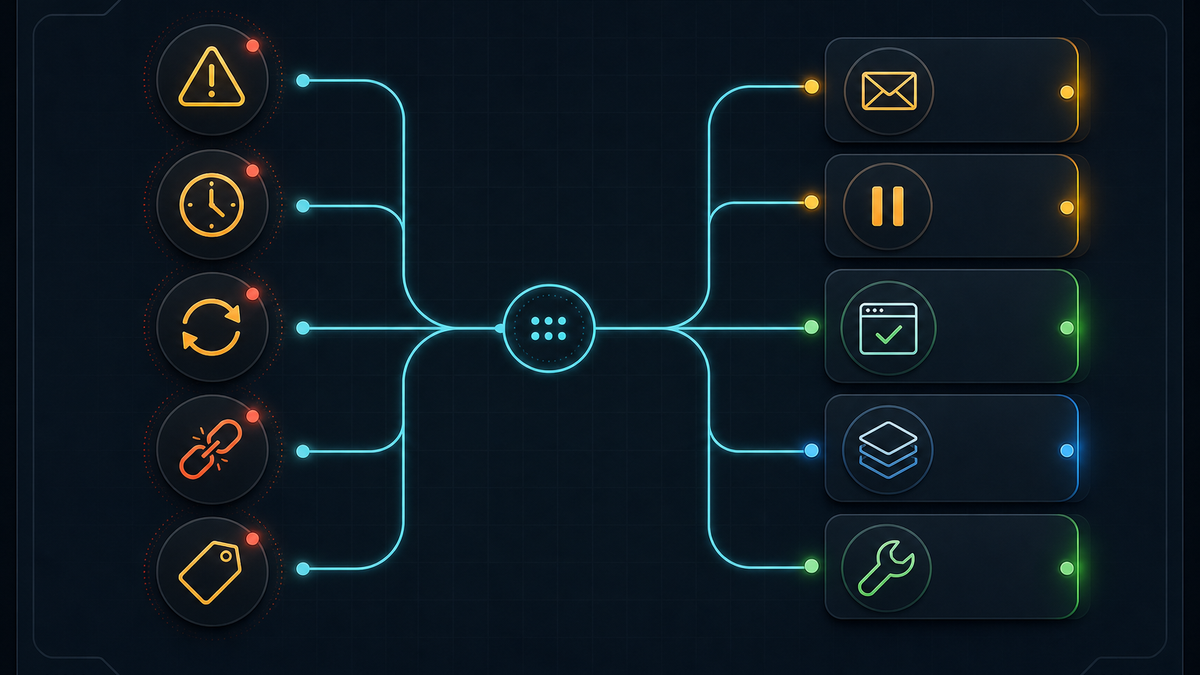
For paid traffic, an approved fallback can protect budget while the landing page is fixed. For SEO migration targets, failover may need more care: a missing page might deserve a replacement page, a 410, or a corrected redirect map, not a silent route to the homepage.
Failover Is Not A Homepage Redirect
Sending every broken destination to the homepage hides the problem and usually gives the visitor a worse answer. It also pollutes campaign and migration reporting.
Use a fallback that matches the original intent:
| Broken Destination | Better Fallback |
|---|---|
| Product page removed temporarily | nearest replacement product, category, or waitlist |
| Product permanently retired | replacement collection, support page, or clear retired-product page |
| Campaign landing page expired early | campaign collection, evergreen offer, or pause until owner approves |
| Local store unavailable | regional store selector or nearest available locale |
| Affiliate destination timeout | approved backup merchant or partner landing page |
| Docs page removed | replacement article, docs index for that topic, or support page |
| App fallback broken on mobile | correct App Store, Google Play, or desktop web fallback |
Automatic failover works best when the fallback is already approved and close to the original intent. If no approved fallback exists, alerting and pausing traffic may be more honest than inventing a destination at runtime.
Keep Parameters And Attribution Intact
A monitored link can pass every status check and still break reporting.
Before launch, decide which parameters must survive each hop:
utm_source,utm_medium,utm_campaign,utm_content, andutm_term- affiliate IDs and partner sub IDs
- coupon or creator codes
- country, language, or store parameters
- app campaign parameters for mobile fallback
- internal rule IDs used for server-side analytics
If a fallback is used, preserve the parameters that still make sense. A paid social click routed to a fallback category should still carry campaign context. An affiliate link should not drop the partner ID unless the team explicitly chooses to stop that program.
UrlEdge can pair destination monitoring with UTM Builder, Temporary 302 Redirects, and rule-level analytics so the team can see whether the failover protected traffic or simply moved the error somewhere else.
Use Different Policies For SEO, Campaigns, And Affiliate Traffic
The wrong response can be worse than the broken link.
SEO migration targets
For migrated URLs, a failure should usually trigger review before automatic routing. A target returning 404 may mean the destination was deleted by mistake, but it may also mean the old resource no longer has a true replacement. Use Bulk URL Management and Redirect Checker to verify high-value paths and inspect redirect chains and loops.
Paid and lifecycle campaigns
For ads, email, SMS, QR, and social campaigns, downtime has a direct cost. If the fallback was approved before launch, failover can keep the campaign useful while the owner fixes the destination. If the fallback is not approved, pause or alert rather than silently sending traffic to a generic page.
Affiliate and partner links
Affiliate and partner destinations need parameter checks as much as status checks. A partner page that returns 200 but drops the affiliate ID can break commission reporting. Monitoring should check final destination, redirect chain, parameter preservation, and timeout behavior.
App fallback links
Device-aware links need separate expectations for iOS, Android, and desktop. If the iOS destination works but Android routes to a dead page, the link is only partly healthy. Pair monitoring with Device Targeting when store and web fallback logic differs by platform.
How UrlEdge Fits
UrlEdge is useful when broken link handling needs to happen close to the traffic path, not in a spreadsheet after the damage is visible.
A practical UrlEdge workflow:
- create the branded link or redirect rule in the Console
- define the expected final destination, status, parameter policy, owner, and fallback
- validate the path with Redirect Checker
- monitor destination health with Broken Link Monitor
- route risky traffic through an approved temporary fallback when the policy allows it
- use Link Firewall when bot, proxy, or suspicious traffic should be filtered before the destination
- review analytics by domain, rule, status, country, device, and destination before making the fix permanent
The goal is not to hide every error. The goal is controlled response: know when a destination changed, protect the traffic that should be protected, and keep enough evidence to fix the underlying page, redirect, or partner route.
Common Mistakes
Checking only before launch
Launch QA catches setup mistakes. Monitoring catches drift: unpublished landing pages, expired campaigns, changed affiliate URLs, product removals, slow origin responses, and new redirect chains.
Treating every 404 as an emergency
Some removed pages should return 404 or 410. The issue is an unexpected error on a link that should still carry active traffic. Monitoring should compare behavior with intent.
Failing over without an owner
If nobody approved the fallback, automatic routing can create a second problem. Every monitored link should have an owner and a response policy.
Ignoring soft failures
Timeouts, redirect loops, wrong-country pages, missing UTMs, and affiliate ID loss can hurt as much as a hard 404. Include them in checks.
FAQ
Should failover always be automatic?
No. Automatic failover is appropriate when the fallback is pre-approved and close to the original intent. SEO migration targets, compliance pages, and partner links often need human review before routing changes.
How often should links be checked?
Match frequency to business risk. Active paid campaigns, printed QR codes, app fallback links, and high-value migration targets deserve more frequent checks than archived blog redirects or low-traffic historical links.
Is a 404 always bad?
No. Some removed resources should return 404 or 410. The problem is an unexpected 404 on a link that still receives active users, crawlers, paid clicks, partner traffic, or offline scans.
What should a fallback preserve?
Preserve the information needed to understand and attribute the visit: UTMs, affiliate IDs, campaign IDs, locale, device context, and internal rule IDs when they are part of the reporting contract.
References
Do not wait for users to find broken links
Monitor destinations, receive alerts, and keep campaign, SEO, and affiliate traffic moving to an approved fallback.
Explore broken link monitoringRelated Articles
View all
www vs apex vs wildcard forwarding without SEO breakage
Host normalization sounds trivial until root, www, subdomains, paths, and query strings disagree. A clean policy keeps the canonical URL stable and avoids redirect chains.

Link Firewall for Paid and Affiliate Traffic: Block Bots, Proxies, and Bad Clicks
Not every bad click is fraud, but every bad click still costs money. A link firewall lets you decide what should happen before paid and affiliate traffic reaches the destination.